This blog explains how a CMMC Acceptable Use Policy helps organizations set clear rules for how employees use company systems, handle sensitive information, and protect Controlled Unclassified Information. It also covers recommended policy sections, end-user responsibilities, and how policy statements can support a System Security Plan.
Key Takeaways
✅ Write policies in plain language so employees can clearly understand their security responsibilities.
✅ A CMMC Acceptable Use Policy should address passwords, approved software, media handling, remote work, physical security, and incident reporting.
✅ Linking policy statements to CMMC objectives can improve traceability and make System Security Plan documentation easier.
Who Should Read This?
This guide is ideal for defense contractors, compliance teams, security leaders, and organizations preparing for CMMC Level 2. It is especially useful for teams that need a clear, practical policy for communicating security rules to non-privileged system users.
Acceptable Use Policy
We've covered every domain within NIST SP 800-171 Rev 2 with a separate policy. Each policy has relevant roles with responsibilities. The roles and responsibilities table also serves as our dissemination list. This alleviates our end-users from having to acknowledge every domain-level policy. It also requires us to communicate end-user responsibilities in a separate policy. As we went through each domain, statements addressable to end-users were set aside. These became the basis for our acceptable use policy. This policy encompasses all domains but focuses on non-privileged end users.
Policy Writing
Acceptable use policies address the behaviors expected of our end users. We require end users to acknowledge having received this policy. We test their comprehension of key content from within the policy. Here are some of the principles that guided this acceptable use policy:
Restating controls does not constitute an organizational policy or procedure.
Policies should omit references to specific technologies.
Use plain language when writing procedures and avoid technical jargon.
Policy Structure
A cover page tracks specific details regarding the policy, including:
Version - number capturing major and minor policy revisions
Effective Date - date of policy dissemination
Last Review Date - date the policy was last reviewed
Next Scheduled Review Date - the date for the next mandatory policy evaluation
Classification - internal categorization of the policy’s sensitivity for confidentiality
We followed our templated structure for all domain level policies. From this guidance we incorporate the following major sections into our policy:
The purpose statement should identify why the policy exists and what it aims to achieve.
The scope should identify who it applies to and under what circumstances.
The policy governance section covers most of the organization defined parameters. These subsections cover the following details:
Policy Dissemination List - defines roles or personnel to disseminate the policy
Procedure Dissemination List - defines roles or personnel to disseminate the procedures
Policy Owner - defines an official to management the policy and supporting procedures
Policy Review Frequency - how often the organization reviews and updates the policy
Policy Review Triggers - events that require an out-of-cycle policy review or update
Procedure Review Frequency - how often the organization reviews and updates the procedures
Procedure Review Triggers - events that require an out-of-cycle procedure review or update
The fourth section includes our policy statements. Subsection headings group related Policy statements together. Each policy statement has a unique number for traceability to other documents. A policy statement number consists of the section, subsection, and policy statement order
The fifth section identifies the relevant roles and responsibilities identified in the policy. A single, short paragraph describes the responsibilities for each role. The sixth section documents a revision history. This table captures policy changes, including: version, effective date, approver(s), change summaries. The seventh section captures a formal acknowledgement of the policy by the end user.
Policy Statements
We used the same section headings from domain policies whenever possible. This helped establish traceability for statements addressing the same controls to different audiences.
Rules for Behavior for System Users
The organization provides information systems only for official business and related tasks. The organization limits access to those with a documented need to use the system. Users must complete their security training before accessing the system. Users must never post internal system details on public websites or social media. The organization reviews all data made public for sensitive content.
Users cannot access social media for personal use on company systems without approval. Users must have approval before using alternative cloud storage or AI applications. Users may not use work email addresses to sign up on any non-business websites. The organization updates these rules every year or whenever major changes happen. All staff sign the rules again every twelve months.
CMMC Objectives Covered in This Section:
(1) objective from AC.L2-3.1.20
(1) objective from AC.L2-3.1.22
(2) objectives from AT.L2-3.2.1
(1) objective from SI.L2-3.14.7
Passwords
The organization requires all passwords to be at least eight characters long. These passwords must include a mix of letters, numbers, and special characters. You cannot use easy-to-guess information like your name, username, or the company name. When you create a new password, it must be completely unique. You cannot change one number or rotate through old passwords you used before.
New users must change their temporary password immediately during their first login. If you do not use your temporary password within 48 hours, the system will disable your account. You are the only person responsible for keeping your password secret. You must never share your login details with anyone, including your boss or the IT team. The organization prohibits writing passwords on notes or saving them in unprotected files. You may only use an approved password manager to store your credentials.
You must not use your work password for personal accounts like your bank or social media. If you think someone stole your password, you must change your password immediately. You must also notify the Security Team right away.
CMMC Objectives Covered in This Section:
(2) objectives from IA.L2-3.5.7
(2) objectives from IA.L2-3.5.8
(1) objective from IA.L2-3.5.9
Session Lock
Users must lock their devices every time they leave their workstations unattended. You must take this action even if you only plan to step away for a short moment.
CMMC Objectives Covered in This Section:
(3) objectives from AC.L2-3.1.10
User-Based Collaboration and Information Sharing
Users must use only approved communication channels when they share sensitive data. The organization prohibits personal chat apps or unencrypted file-transfer sites for work-related information.
CMMC Objectives Covered in This Section:
(1) objective from AC.L2-3.1.3
User Installed Software
Users must not install any unauthorized software or applications on company-owned devices. This rule applies to downloads from the Internet and software from a thumb drive. You must submit all software requests to the IT department for formal approval.
CMMC Objectives Covered in This Section:
(1) objective from CM.L2-3.4.9
Media Storage
Personnel must store all sensitive media in secured areas. This rule applies to everything from hard drives and flash drives to paper records. When you move sensitive documents, you must place them in sealed envelopes. If you take these materials out of controlled areas, you must track them using a formal log.
The organization prohibits connecting personal USB drives, smartphones, or cameras to company systems. If you receive an exception to use portable media, you must keep it locked in a drawer or safe when you are not using it. You must never leave removable media unattended. Do not use portable storage devices containing sensitive data on outside systems. Use an approved secure file-sharing platform for all data transfers to external partners.
CMMC Objectives Covered in This Section:
(3) objectives from AC.L2-3.1.21
(4) objectives from MP.L2-3.8.1
(1) objective from MP.L2-3.8.2
(2) objectives from MP.L2-3.8.5
(1) objective from MP.L2-3.8.7
(1) objective from MP.L2-3.8.8
Media Marking
Users must mark all media containing sensitive data. Mark CUI data in the banner at the top and bottom of every page or on the physical exterior of the device. You must also include labels that explain who can see the information. If a device is too small for a full label, you must store it in a marked envelope or container instead.
When you work with digital files, you must include the "CUI" designation in the filename. You must also update the headers and footers before you save them to shared folders.
CMMC Objectives Covered in This Section:
(2) objectives from MP.L2-3.8.4
Access Control for Display Media
Users must mark all paper records with the correct "CUI" label as soon as they collect them. You are responsible for the physical safety of printed materials. When you print or copy sensitive documents, you must go to the machine and pick them up immediately. Never leave sensitive files sitting in a shared output tray where others could see them.
CMMC Objectives Covered in This Section:
(1) objective from MP.L2-3.8.1
(2) objectives from MP.L2-3.8.4
Physical Access Control
Personnel must keep all assigned keys, badges, and tokens in their physical custody. You must never share these items or leave them unattended. Report lost access devices suspicious events to security personnel immediately.
You are responsible for keeping your workspace and the office entrance secure. You must badge in every time you enter a door to prevent others from following you inside. If you have a visitor, you must ensure they sign the log and stay with them at all times. If you see someone you do not recognize alone in nonpublic areas, call security right away.
CMMC Objectives Covered in This Section:
(1) objective from PE.L2-3.10.2
(2) objectives from PE.L2-3.10.3
(1) objective from PE.L2-3.10.5
Alternate Work Sites
Personnel must use only approved devices when working remote with sensitive data. You must connect through a secure VPN that requires multi-factor authentication. When handling sensitive information, do not use unauthorized devices or public Wi-Fi.
You are responsible for the safety of your home office or remote workspace. You must ensure that unauthorized people cannot see your screen or overhear conversations. Secure your devices and media to prevent loss or theft while working away from the main office.
CMMC Objectives Covered in This Section:
(2) objectives from PE.L2-3.10.6
Incident Response
All employees, contractors, and third-party users must immediately report any security incidents. You should notify your manager or the security personnel as soon as you see a suspected threat. Use the official reporting tools, such as the Help Desk or the security email address.
CMMC Objectives Covered in This Section:
(1) objective from IR.L2-3.6.1
Employee Transfer and Termination
Upon leaving or changing your role, you must return all company property and data. This includes hardware as well as physical items like your ID badge and keys. You must return all sensitive documents and delete corporate information from personal devices.
The organization requires you to complete an offboarding checklist. You must surrender all company property before your final departure. Keeping any corporate data or hardware may lead to legal consequences.
CMMC Objectives Covered in This Section:
(1) objective from PS.L2-3.9.2
Personnel Sanctions
The organization penalizes employees, contractors, or third parties who breaks the rules. Human Resources and the security personnel manage this process together. Penalties can include written warnings, losing system access, extra training, or your job. When violations trigger penalties, the organization must notify designated personnel within 24 hours. This report must include the person's name and a description of which rule they broke.
CMMC Objectives Covered in This Section:
(1) objective from AT.L2-3.2.1
Syncing Policies with System Security Plan
FedRAMP guidance on how to write a control implementation statement states the following:
Implementation statements should reference supporting policies and procedures.
If a document is long, point to the exact sections that matter instead of the whole thing.
Write summaries so that reviewers don't have to go look up other documents.
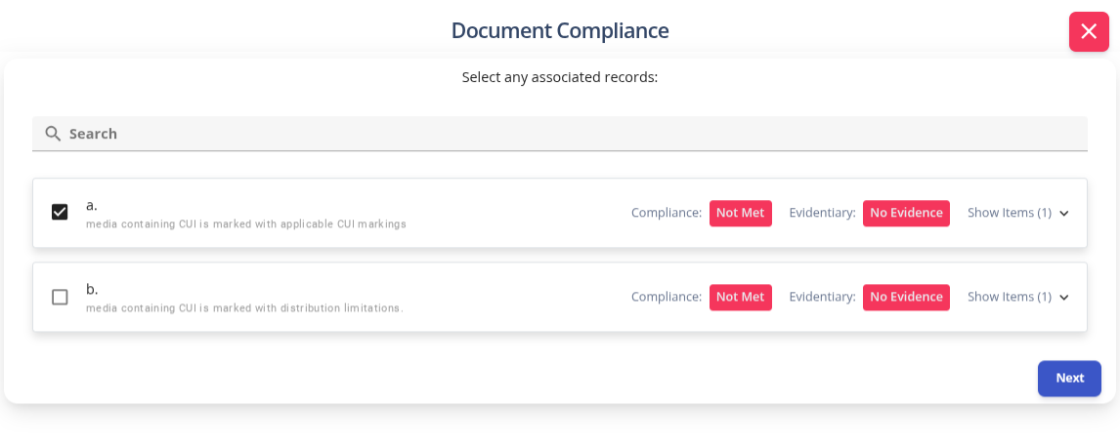
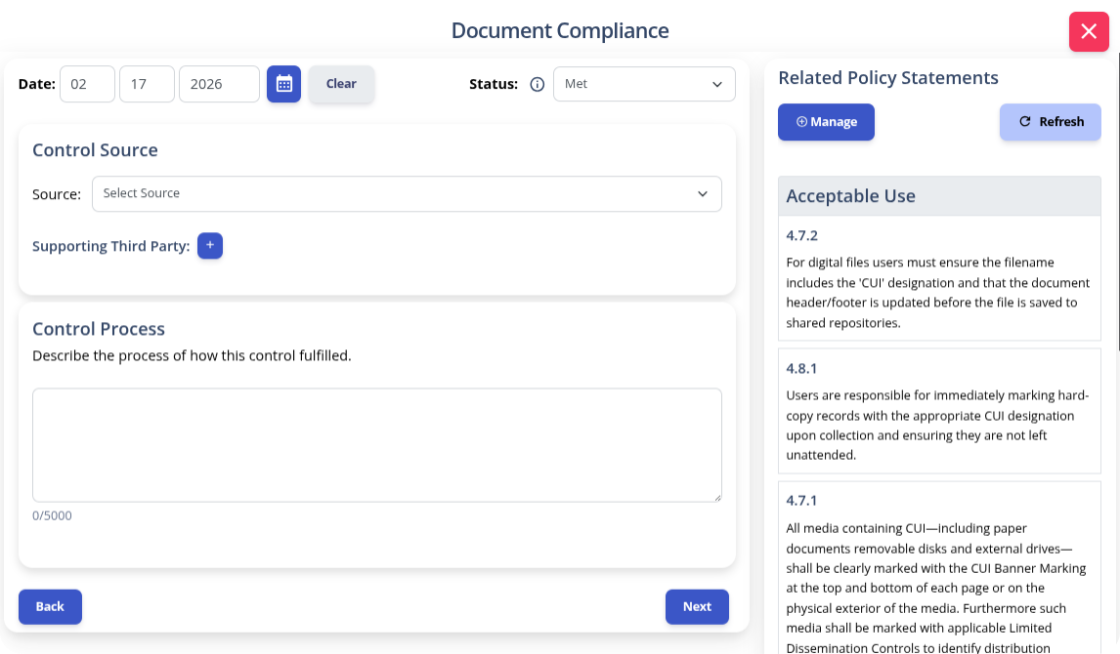
Write your policies before you start drafting your security plan. K2 GRC shows you exactly how each part of your policy connects to your security goals. This starts with selecting an objective to document.
After selecting a criteria, K2 GRC shows policy statements relevant to that criteria. The input screen shows the specific policy name and the statement’s number. This enables users to cite relevant policy sections within the control narratives. The system aggregates these control narratives to populate the system security plan (SSP).
Navigating the complexities of CMMC can feel like a high-stakes balancing act. You are protecting your reputation and the contracts that keep your business thriving. We know the weight of that responsibility can be overwhelming. A password on a sticky note could jeopardize everything you’ve worked to build. But security doesn't have to be a source of constant anxiety.
A clear Acceptable Use Policy (AUP) replaces uncertainty with shared responsibilities. You empower your team with the knowledge they need to be your strongest line of defense. Don't let the fear of an audit keep you up at night. Take the first step toward a more secure, confident future today. Download our AUP Template for CMMC. Give your team the framework they need to stay focused on the work that matters most.
❓ Frequently Asked Questions About CMMC Acceptable Use Policies
What is a CMMC Acceptable Use Policy?
A CMMC Acceptable Use Policy defines how employees, contractors, and other users should access company systems, handle sensitive data, and protect Controlled Unclassified Information. It turns security requirements into clear rules that end users can understand and follow.
Is an acceptable use policy required for CMMC Level 2?
CMMC Level 2 does not require one document with the exact title “Acceptable Use Policy.” However, organizations must document and communicate user responsibilities related to access control, media protection, passwords, incident reporting, and other CMMC practices.
What should a CMMC Acceptable Use Policy include?
A CMMC Acceptable Use Policy should address passwords, session locking, approved software, communication tools, removable media, remote work, physical access, incident reporting, and employee offboarding. It should also explain who the policy applies to, who owns it, and how often it is reviewed.
How does an acceptable use policy support NIST SP 800-171 compliance?
An acceptable use policy helps communicate end-user responsibilities connected to NIST SP 800-171 requirements. It can support areas such as access control, identification and authentication, media protection, physical protection, incident response, and security awareness.
Do employees need to acknowledge a CMMC Acceptable Use Policy?
Employees should formally acknowledge that they received and understood the policy. Organizations may also use training or knowledge checks to confirm that users understand important requirements and their responsibilities for protecting CUI.
How often should a CMMC Acceptable Use Policy be reviewed?
A CMMC Acceptable Use Policy should generally be reviewed at least once a year. It should also be updated when systems, security requirements, business processes, or employee responsibilities change.
How does an acceptable use policy connect to a System Security Plan?
Policy statements can be referenced within System Security Plan control narratives to show how the organization addresses specific CMMC objectives. Using numbered policy sections makes it easier for assessors and internal teams to trace documented rules back to supporting controls.
Learn how to build an AI risk management policy that addresses governance, risk appetite, AI security risks, regulatory requirements, and ongoing monitoring.
A risk register helps organizations identify, assess, and manage potential risks in one centralized place. Learn the key components of a risk register, how to create and maintain one, and how it supports a more proactive approach to risk management.
New K2 Assist AI, AI-powered Readiness Review, MCP integration and Skills bring AI-driven execution and assessment capabilities to governance, risk, compliance and training workflows.