This blog provides a technical roadmap for building an Access Control (AC) policy that meets CMMC Level 2 standards. It moves beyond simple "login" rules to cover complex authorization protocols, remote access encryption, and data flow enforcement to protect Controlled Unclassified Information (CUI).
Key Takeaways
✅ Policy-Driven Authorization: Focuses on what a user can do after identity is proven, emphasizing the Principle of Least Privilege.
✅ Separation of Duties: Ensures critical
Access control is the foundational barrier against unauthorized system access. Access controls can be technical, physical, or administrative in nature. They dictate the boundaries of how subjects interact with protected objects. Subjects can be users, processes, or devices and objects can be files, databases, or systems. Industry often groups identification, authentication, and authorization together.
It is important to note that the NIST Access Control domain focuses on authorization. This defines the authorized operations a subject may perform after proving their identity. To meet CMMC requirements, organizations must adopt a policy-driven approach. This blog will outline how to build an Access Control policy that satisfies CMMC Level 2.
Policy Writing
Domain level policies address the controls implemented within systems and organizations. Policies are the perfect home to define control parameters, such as frequencies. Procedures describe the implementation of policies or controls. Organizations may document procedures within the system security plan or within separate documents. Here are some of the parameters we followed when writing this access control policy:
Restating controls does not constitute an organizational policy or procedure.
Policies should omit references to specific technologies.
Address procedures to the individual or role performing the task.
Use plain language when writing procedures and avoid technical jargon.
Policy Structure
A cover page tracks specific details regarding the policy, including:
Version - number capturing major and minor policy revisions
Effective Date - date of policy dissemination
Last Review Date - date the policy was last reviewed
Next Scheduled Review Date - the date for the next mandatory policy evaluation
Classification - internal categorization of the policy’s sensitivity for confidentiality
NIST SP 800-53 defines specific objectives for domain-level policies. From this guidance we incorporate the following major sections into our policy:
The purpose statement should identify why the policy exists and what it aims to achieve.
The scope should identify who it applies to and under what circumstances.
The policy governance section covers most of the organization defined parameters. These subsections cover the following details:
Policy Dissemination List - defines roles or personnel to disseminate the policy
Procedure Dissemination List - defines roles or personnel to disseminate the procedures
Policy Owner - defines an official to management the policy and supporting procedures
Policy Review Frequency - how often the organization reviews and updates the policy
Policy Review Triggers - events that require an out-of-cycle policy review or update
Procedure Review Frequency - how often the organization reviews and updates the procedures
Procedure Review Triggers - events that require an out-of-cycle procedure review or update
The fourth section includes our policy statements. Subsection headings group related Policy statements together. Each policy statement has a unique number for traceability to other documents. A policy statement number consists of the section, subsection, and policy statement order.
The fifth section identifies the relevant roles and responsibilities identified in the policy. A single, short paragraph describes the responsibilities for each role. The sixth section identifies the supporting procedures. We opted to align our subsection headings with the names of supporting procedures. The seventh section identifies related documents, to include relevant policies. The eighth section documents a revision history. This table captures policy changes, including: version, effective date, approver(s), change summaries. The ninth section captures a formal authorization of the policy by the policy owner.
Policy Statements
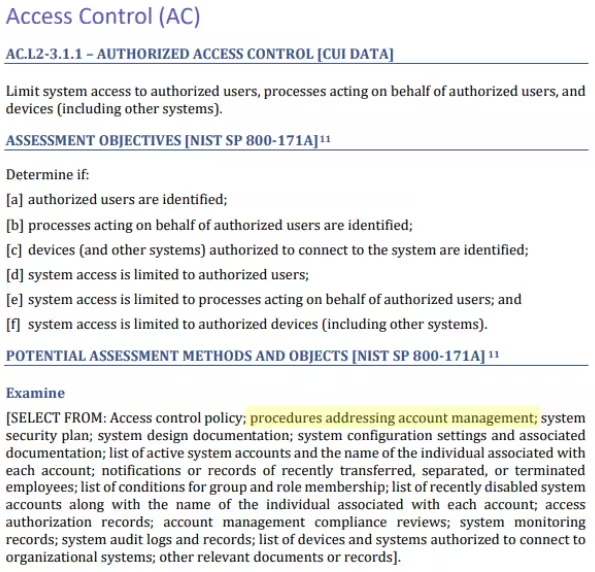
NIST identified a named set of procedures for each practice within NIST SP 800-171. The assessment guide (SP 800-171A) contains the original mappings. The CMMC assessment guides include this mapping as well. The potential assessment methods and objects section contains a subsection called examine. Within each practice, NIST identified relevant policies, procedures and other artifacts.
Account Management
This subsection defines provisioning, maintenance, inactivity, and deprovisioning of user accounts. The provisioning process validates user identity and training before granting access. We mandate quarterly reviews of authorizations and define inactivity periods for disabling accounts. A deprovisioning process ensures the removal of access when a user no longer requires it.
CMMC Objectives Covered in This Section:
(3) objectives from AC.L2-3.1.1
(2) objectives from IA.L2-3.5.6
(1) objective from PS.L2-3.9.1
(1) objective from PS.L2-3.9.2
(1) objective from PE.L2-3.10.1
Separation of Duties
This section makes sure no single person controls a major task from start to finish. We split duties among different people to keep the system safe:
Approvals: The person asking for a change cannot be the one who approves it.
Setups: Managers approve access, but only System Admins enable that access.
Monitoring: If you perform a special task, someone else must watch and check your work.
CMMC Objectives Covered in This Section:
(3) objectives from AC.L2-3.1.4
Least Privilege
This section explains how we limit access to protect the system. The "Principle of Least Privilege," provides access to only the tools needed to do the job.
We define standard and privileged access:
Standard Access: Every new account starts as a "non-privileged" user. These accounts can only do basic business tasks.
Privileged Access: Only a few people can make big changes. This includes updating security logs, installing software, or changing network settings. We limit this power to the smallest number of people possible.
We provide administrators with two separate accounts:
A Standard Account for daily work like email and web browsing.
A Privileged Account used only for technical system management.
Before someone gets extra power, they must sign a "Privileged User Agreement." This agreement requires them to follow stricter rules and accept more oversight. We also define security-relevant information and limit access to authorized individuals.
We use a formal Change Management process for all system updates. Every three months, we review all permissions. If someone no longer needs a specific power, we remove it immediately to keep the system lean and secure.
CMMC Objectives Covered in This Section:
(4) objectives from AC.L2-3.1.5
(2) objectives from AC.L2-3.1.6
(3) objectives from AC.L2-3.1.7
(2) objectives from AC.L2-3.1.15
(4) objectives from CM.L2-3.4.5
(3) objectives from SC.L2-3.13.3
Access Enforcement
This section explains how we control who enters our systems and buildings. We use a strict process to make sure everyone has exactly what they need to do their job.
Before the System Administrator approves any request, they must check two things:
The user passed all background checks.
The user finished the right security training for their role.
We give out access based on your specific job and department. Your supervisor must also confirm that you need this access to finish your work. Instead of giving permissions to one person at a time, we use security groups. As your job changes, we move you in or out of these groups to keep your access up to date.
We don't "turn on" access; we control exactly what you can do. If you only need to read a file, the system will not let you change or delete it. We separate rights into specific actions:
Read: You can look at data.
Write: You can change data.
Delete: You can remove data.
Execute: You can run programs.
We also limit access for outside apps and services. We block "full admin" access for these tools unless there is a very special reason. This keeps our data safe even when connecting to other software.
CMMC Objectives Covered in This Section:
(2) objectives from AC.L2-3.1.2
(1) objective from AT.L2-3.2.1
(1) objective from PS.L2-3.9.1
System Use Notification
All information systems display a mandatory warning banner before granting user access. The notification informs users that:
the system is for authorized use only;
the organization monitors usage and no expectation of privacy exists;
unauthorized use may lead to penalties; and
use of the system constitutes consent to these terms.
Systems handling CUI must display text consistent with the specific CUI category.
CMMC Objectives Covered in This Section:
(2) objectives from AC.L2-3.1.9
Information Flow Enforcement
This section explains how we track and control the movement of sensitive data. We use visual maps and strict technical rules to control information flows.
We keep current maps called Data Flow Diagrams (DFDs) and lists of all our hardware and software. We review and update these maps every year, or sooner if we make a big change to our systems. These maps show exactly:
Where sensitive data (like CUI) starts and where it ends.
Parts of our system that are accessible to the public (like our website).
Network segments authorized to handle this information.
We use "traffic cops" for our data to keep it safe. To move data, we follow these rules:
Data Owners decide who gets into the security groups handling sensitive info.
Every system that holds sensitive data requires a login from an approved account.
We use firewalls and encrypted tunnels to create a "CUI Enclave." This secure vault prevents data from leaking out.
We use Access Control Lists (ACLs) and Data Loss Prevention (DLP) tools to enforce these rules. These tools prevent someone sending data to unapproved places or use unsecure methods.
CMMC Objectives Covered in This Section:
(4) objectives from AC.L2-3.1.3
(1) objective from SC.L2-3.13.5
Remote Access
This section focuses on keeping the network safe when people connect from outside. We use "Remote Access" to let users work from home or use cloud systems while keeping our data locked down.
Before you can connect from home, a manager must approve your request. We record every approval in our Access Database. This ensures we know exactly who has the right to log in from the outside. We do not allow "backdoors" or direct connections that skip our security checks. Instead, all remote work must follow these rules:
You must use Multi-Factor Authentication (MFA) to prove your identity.
We use high-level encryption to keep your data secret while it travels over the internet.
Every session must pass through a managed gateway to identify and log activity.
Authorized remote connections for system repairs must use MFA and disconnect after finishing. If you log in from a risky location, we limit your access to standard business hours. You can only run system commands if your specific "Cloud Role" allows it. Automated tasks must happen during pre-set times that we have already approved. A central server captures your IP address, identity, and other activity details. A security team reviews the logs for suspicious behavior.
CMMC Objectives Covered in This Section:
(3) objectives from AC.L2-3.1.12
(2) objectives from AC.L2-3.1.14
(4) objectives from AC.L2-3.1.15
(2) objectives from MA.L2-3.7.5
Wireless Access
This section explains how we manage wireless connections. We limit our internal Wi-Fi to authorized users and devices only. To keep the network secure, we follow these rules:
We prohibit the use of shared Wi-Fi passwords.
Authentication uses username and password or a company-issued digital certificate.
The system revokes wireless access upon the termination of the user’s account or device.
A guest network accommodates devices that do not have corporate credentials. This network provides internet access only. Logical isolation separates guests from internal files or sensitive information (CUI).
CMMC Objectives Covered in This Section:
(1) objectives from AC.L2-3.1.16
(1) objectives from AC.L2-3.1.17
Wireless Implementation and Usage
This section describes securing the physical and digital parts of our wireless network. We treat every Wireless Access Point (WAP) as a valuable asset. To keep them safe, we:
We give every WAP a unique ID and keep them on a master list.
We install WAPs in secure spots, like high ceilings or locked boxes, so no one can steal or tamper with them.
If a computer or server doesn't need Wi-Fi to do its job, we turn off the Wi-Fi chip completely at the hardware level.
Before we turn on a new WAP, we "harden" it. This means we change all the factory settings. We replace the default usernames, passwords, and security keys. We also hide the names of our private admin networks so they don't show up on public devices.
We use high-level "Enterprise" security modes to protect our data:
Our system checks your digital ID against our main office list before letting you in.
We use "FIPS-validated" encryption. This is a high-standard security method used to protect sensitive government information.
We use firewalls to act as digital guards between the Wi-Fi and our most sensitive data. We also keep a close watch for "Rogue" devices. Every three months, we scan our office for any unauthorized Wi-Fi signals. If we find an unknown WAP, we shut it down immediately.
CMMC Objectives Covered in This Section:
(2) objectives from AC.L2-3.1.16
(2) objectives from AC.L2-3.1.17
(1) objective from AC.L2-3.1.18
(1) objective from CM.L2-3.4.2
(4) objectives from CM.L2-3.4.7
(1) objective from PE.L2-3.10.1
(1) objective from PE.L2-3.10.2
(2) objectives from SC.L2-3.13.10
Session Lock
This section explains how we prevent unauthorized access to computers left unattended. If you do not use your computer or cloud session for 15 minutes, the system will lock you out. The system also locks the device immediately after disabling a user's account.
When a device locks, it must hide whatever you were working on. The screen must go blank or show a "pattern-hiding" image (like a screensaver) right away. This ensures that no one walking by can see sensitive data on your screen while you are away from your desk.
CMMC Objectives Covered in This Section:
(3) objectives from AC.L2-3.1.10
Session Termination
This section describes the time limits we set on active connections. When a user connects from a public or outside network, sessions only last for 60 minutes. Once that hour is up, the system will ask the user to log in again. For users working inside our network, we set a firm limit of 24 hours. Even if users are working, the system will force you to re-authenticate once every day. These checks prove they are still the authorized user.
CMMC Objectives Covered in This Section:
(2) objectives from AC.L2-3.1.11
(1) objective from AC.L2-3.1.12
Unsuccessful Logon Attempts
This section explains how we stop hackers from trying to guess passwords. By setting a limit on login mistakes, we prevent "brute force" attacks. To protect our accounts, we set the following rules for everyone:
If someone enters the wrong password three times in a row, the system freezes that account.
Locked accounts stay frozen for at least 30 minutes.
We enforce this rule everywhere. It doesn't matter if you are logging in from your office desk or over the network.
CMMC Objectives Covered in This Section:
(2) objectives from AC.L2-3.1.8
Content Accessible to the Public
This section explains how we control the information shared on our public systems. We take these steps to make sure sensitive company or government data never ends up where the public can see it.
We approve specific people to post or process information on our public systems. We keep an official list of these authorized users in our Access Management Database. Before any content goes live, we review it. We follow a strict checklist to make sure the information does not contain:
FCI: Federal Contract Information.
CUI: Controlled Unclassified Information.
Our security team performs a deep dive every three months. They scan all public systems to verify the absence of sensitive data.
CMMC Objectives Covered in This Section:
(4) objectives from AC.L2-3.1.22
Use of External Systems
This section explains the rules we follow when connecting to outside systems. Before we connect to any outside system, we perform a deep security check, including:
Our Change Advisory Board (CAB) must check the system's security first.
The Chief Information Security Officer (CISO) must sign an Interconnection Security Agreement (ISA). This document lists exactly what data is being shared and how we will protect it.
To keep sensitive information safe, we have very strict rules about how you work:
The Acceptable Use Policy prohibits the use of unauthorized devices, media and networks.
Users must use company-approved, encrypted laptops or devices.
All work must go through a secure VPN that uses Multi-Factor Authentication (MFA).
We review authorized external connections every year. We don't trust an outside system because it has the right name. Our network uses certificates or encrypted codes to verify the other system.
CMMC Objectives Covered in This Section:
(1) objective from AC.L2-3.1.1
(4) objectives from AC.L2-3.1.20
Access Control for Mobile Devices
This section explains how we protect sensitive information on mobile devices. Mobile Policies create a secure, private container on users' devices. To keep our information safe, mobile devices must follow these strict rules:
We only allow mobile devices to access authorized email services. You cannot use other system apps to view sensitive data on your phone.
Protect all work data stored on your phone by "FIPS-validated" encryption.
Our system blocks any device that isn't safe. This includes modified devices or devices that are not encrypted.
We watch every connection attempt from a mobile device to spot anything suspicious. For every login or email sync, we record:
Who is trying to connect (User ID).
What device they are using.
Where they are connecting from (IP address).
Result: We track if the login was successful or if it failed.
This data goes straight to our security logs so we can analyze it and keep the network safe.
CMMC Objectives Covered in This Section:
(3) objectives from AC.L2-3.1.18
(1) objectives from AC.L2-3.1.19
(1) objectives from SC.L2-3.13.11
(1) objectives from SC.L2-3.13.16
Syncing Policies with System Security Plan
FedRAMP guidance on how to write a control implementation statement states the following:
Implementation statements should reference supporting policies and procedures.
If a document is long, point to the exact sections that matter instead of the whole thing.
Write summaries so that reviewers don't have to go look up other documents.
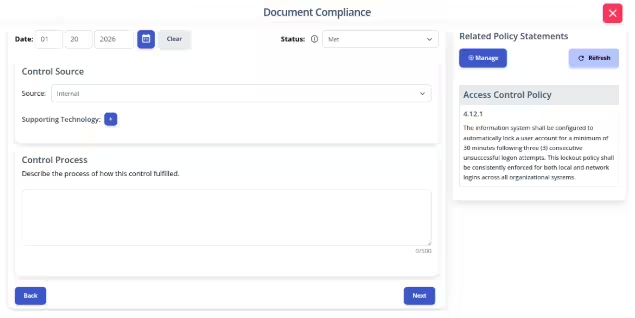
Write your policies before you start drafting your security plan. K2 GRC shows you exactly how each part of your policy connects to your security goals.
The input screen shows the specific policy rule and its ID number. This helps you pick out and name exact parts of a policy. The system then adds your work to the final security plan template.
Conclusion
Building a strong Access Control policy is about more than passing an assessment. It should create a real defense for your most private data. When you lead with a clear policy, you make sure all parts of the system meet the same security standards.
In this blog, we showed how a great policy helps you in three ways:
It Sets the Rules
It Assigns Roles
It Makes Assessments Easy
Follow the golden rule of compliance: Write your policies first. If you set your goals early, writing your plans and procedures becomes much easier. Tools like K2 GRC show these connections in real-time. This helps you track every detail and ensures you never miss a step.
By using this framework, you do more than populate a template. You build a safe culture that protects your business, your partners, and your future.
❓ Frequently Asked Questions: Access Control
What is the 'Principle of Least Privilege'?
It is the practice of limiting user access rights to only the bare minimum permissions they need to perform their job. For example, most users start with "standard" access, and only a select few are granted "privileged" access for system management tasks.
How does CMMC handle remote access?
Remote access must be managed through secure gateways using Multi-Factor Authentication (MFA) and high-level encryption. All external connections must be approved by a manager and recorded in an Access Database.
What happens after too many failed login attempts?
To prevent brute-force attacks, CMMC guidelines suggest locking an account after three unsuccessful attempts. These accounts should remain frozen for a minimum of 30 minutes before a reset or retry is allowed.
Why are Data Flow Diagrams (DFDs) important for Access Control?
DFDs visually map where sensitive data (CUI) lives and moves. This allows security teams to identify network segments that need strict isolation and ensure that data doesn't leak into public-facing systems.
Learn how to build an AI risk management policy that addresses governance, risk appetite, AI security risks, regulatory requirements, and ongoing monitoring.
A risk register helps organizations identify, assess, and manage potential risks in one centralized place. Learn the key components of a risk register, how to create and maintain one, and how it supports a more proactive approach to risk management.
New K2 Assist AI, AI-powered Readiness Review, MCP integration and Skills bring AI-driven execution and assessment capabilities to governance, risk, compliance and training workflows.