The launch of K2 GRC 13.0.0 marks a major milestone for the platform, introducing a more intuitive data model and a massive upgrade to the eLearning Service. This release focuses on alignment with industry standards and automation to reduce the manual burden on compliance officers.
Key Takeaways
✅ Terminology Shift: "Requirements" have been renamed to "Controls" to align perfectly with frameworks like NIST and ISO.
✅ eLearning Automation: Training completions can now automatically trigger task status updates and evidence collection.
✅ Enhanced Reporting: Three new reports (Organizational Unit, Training Answers, and Workforce) provide granular visibility into compliance progress.
✅ Performance Boost: A new caching layer and Quick Navigation (Ctrl+P) significantly speed up daily workflows.
Who Should Care?
Platform administrators, compliance leads, and workforce managers using K2 GRC to track organizational training and audit readiness.
We are thrilled to launch K2 GRC 13.0.0! This release introduces foundational changes to our data model, a new authorization system, and significant performance enhancements to make the platform faster and more intuitive.
✨ Major New Features
This release is headlined by a foundational terminology change, as "Requirements" are now "Controls" to better align with industry standards. We have also significantly upgraded the eLearning module, introducing powerful automation rules for training and a suite of new reports to track progress, answers, and workforce status.
Governance and Compliance Services
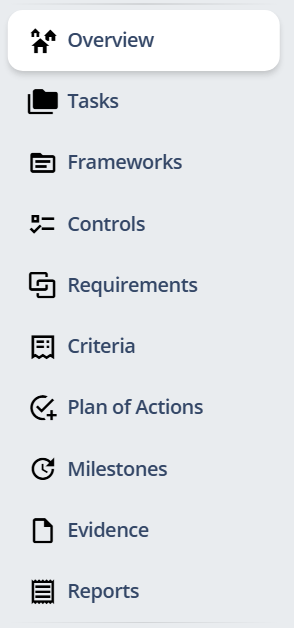
A Foundational Change: "Requirements" are now "Controls" The most significant change in this version is a platform-wide update to our terminology. To better align with industry-standard language (like NIST, ISO, etc.), what were previously called "Requirements" are now "Controls." This is a change in name only—all your data, relationships, and functionality remain the same. You will see this "Control" language reflected in all menus, reports, and pages.
eLearning Service
Smarter eLearning & Task Integration We've created a new, deeper connection between the eLearning module and the core platform. Completing a training module can now automatically update the status of related tasks and evidence, saving you manual steps and improving data accuracy.
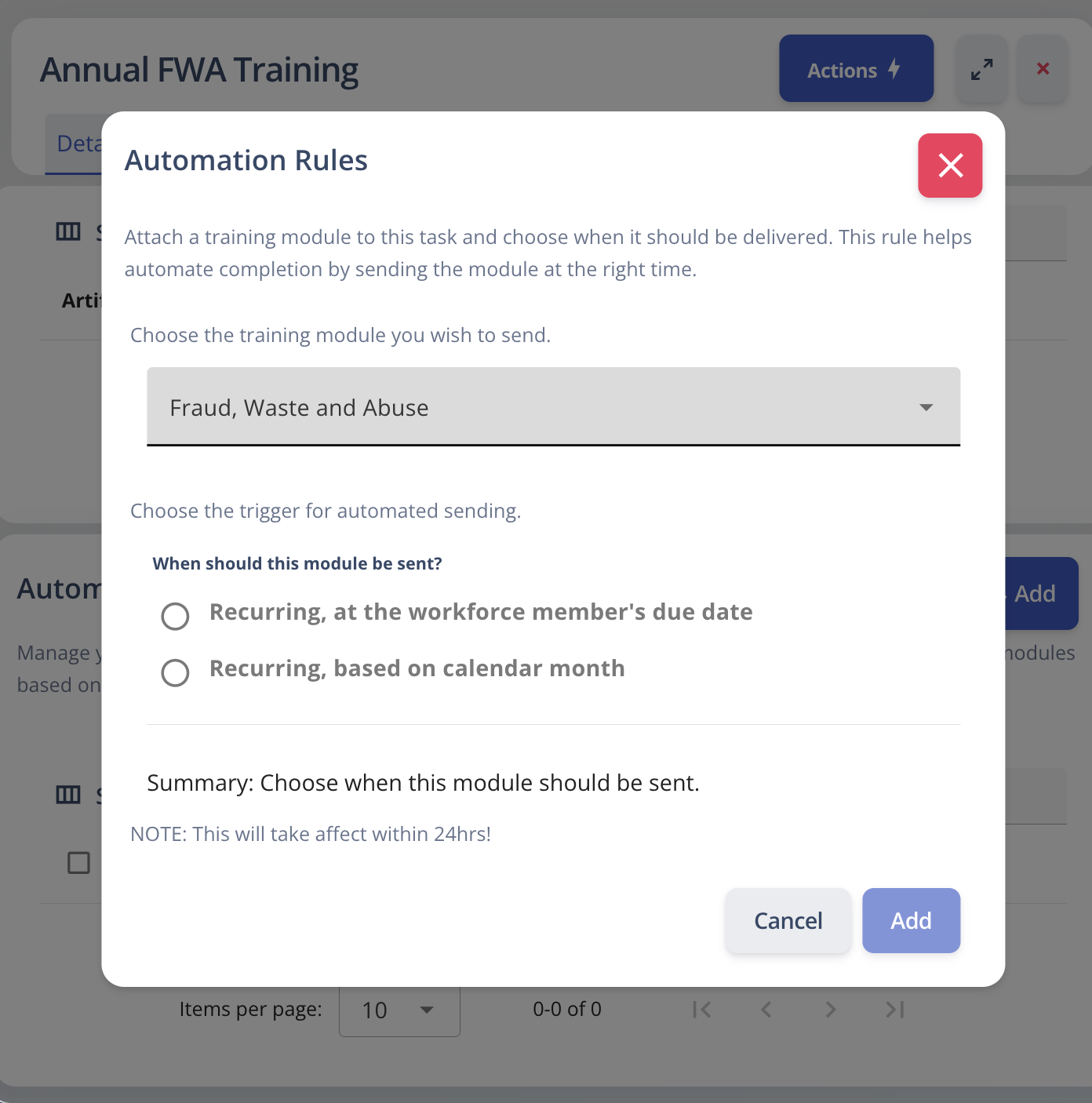
eLearning Automation Rules: We’ve created a way for users to create automation rules for Tasks within eLearning, enabling users to have two options of sending out training for the workforce members due date, or based on the month of the users choice!
New eLearning Reports: "Organizational Unit" A new report has been added to the eLearning module, giving you the ability to see training progress and status broken down by your organization's business units. “Training Answers Report” This new report allows you to see what users responded with for custom training modules enabling admins to review free text and multiple choice responses. “Workforce Report” A new report enabling admins to see overall status of an individual workforce member, or all members, for a specific module or all modules.
🛠️ Enhancements & User Experience
Significant Performance & Speed Improvements We have implemented a new, organization-wide caching layer for user data and queries. You'll notice faster load times on pages, reports, and dashboards as the system can now retrieve common information much more quickly.
Quick Navigation Dialog Get where you need to go, faster. You can now press Ctrl + P (or Cmd + P on Mac) anywhere in the application to open a quick-navigation dialog. Just type the name of the page you want, and jump there instantly.
⚙️ For Developers & Administrators
Removed Endpoint
The Scope Delete endpoint has been removed from the API.
❓ K2 GRC 13.0.0: Frequently Asked Questions
Does renaming 'Requirements' to 'Controls' affect my existing data?
No. This is a terminology change only. All your existing data, evidence, and mapping remain identical—it simply reflects the language used in major frameworks like NIST and ISO to make your audits more intuitive.
How do the new eLearning automation rules work?
You can now set triggers so that when a workforce member completes a specific module, the platform automatically updates related task statuses. You can also schedule training rollouts based on specific due dates or chosen months.
What is the 'Quick Navigation' feature?
By pressing Ctrl + P (or Cmd + P on Mac), a search dialog appears that allows you to jump to any page in the platform instantly without clicking through menus.
Are there any changes for developers using the API?
Yes. Specifically, the Scope Delete endpoint has been removed from the API in this release. Please update your integrations accordingly.
Learn how to build an AI risk management policy that addresses governance, risk appetite, AI security risks, regulatory requirements, and ongoing monitoring.
A risk register helps organizations identify, assess, and manage potential risks in one centralized place. Learn the key components of a risk register, how to create and maintain one, and how it supports a more proactive approach to risk management.
New K2 Assist AI, AI-powered Readiness Review, MCP integration and Skills bring AI-driven execution and assessment capabilities to governance, risk, compliance and training workflows.