The Identification and Authentication (IA) domain acts as the digital security gate. It ensures that the system knows exactly who is trying to log in and verifies that they are who they say they are. For identification, you assign a unique name or ID to every user and device. Because every action ties to a unique ID, your logs will show who accessed specific data and when. Authentication requires users to prove their identity before the system lets them in. This domain places a heavy focus on Multi-Factor Authentication (MFA). Relying on a password alone is no longer safe in the modern world, MFA adds extra layers of protection. These controls protect your organization from the most common types of cyber attacks. You gain certainty that only authorized employees can reach your sensitive files. Your network can identify and block devices that do not have the right credentials. Identification and Authentication controls replace blind trust by demanding proof before granting access.
Policy Writing
Domain level policies address the controls implemented within systems and organizations. Policies are the perfect home to define control parameters, such as frequencies. Procedures describe the implementation of policies or controls. Organizations may document procedures within the system security plan or within separate documents. Here are some of the principles that guided this identification and authentication policy:
Restating controls does not constitute an organizational policy or procedure.
Policies should omit references to specific technologies.
Address procedures to the individual or role performing the task.
Use plain language when writing procedures and avoid technical jargon.
Policy Structure
A cover page tracks specific details regarding the policy, including:
Version - number capturing major and minor policy revisions
Effective Date - date of policy dissemination
Last Review Date - date the policy was last reviewed
Next Scheduled Review Date - the date for the next mandatory policy evaluation
Classification - internal categorization of the policy’s sensitivity for confidentiality
NIST SP 800-53 defines specific objectives for domain-level policies. From this guidance we incorporate the following major sections into our policy:
The purpose statement should identify why the policy exists and what it aims to achieve.
The scope should identify who it applies to and under what circumstances.
The policy governance section covers most of the organization defined parameters. These subsections cover the following details:
Policy Dissemination List - defines roles or personnel to disseminate the policy
Procedure Dissemination List - defines roles or personnel to disseminate the procedures
Policy Owner - defines an official to management the policy and supporting procedures
Policy Review Frequency - how often the organization reviews and updates the policy
Policy Review Triggers - events that require an out-of-cycle policy review or update
Procedure Review Frequency - how often the organization reviews and updates the procedures
Procedure Review Triggers - events that require an out-of-cycle procedure review or update
The fourth section includes our policy statements. Subsection headings group related Policy statements together. Each policy statement has a unique number for traceability to other documents. A policy statement number consists of the section, subsection, and policy statement order.
The fifth section identifies the relevant roles and responsibilities identified in the policy. A single, short paragraph describes the responsibilities for each role. The sixth section identifies the supporting procedures. We opted to align our subsection headings with the names of supporting procedures. The seventh section identifies related documents, to include relevant policies. The eighth section documents a revision history. This table captures policy changes, including: version, effective date, approver(s), change summaries. The ninth section captures a formal authorization of the policy by the policy owner.
Policy Statements
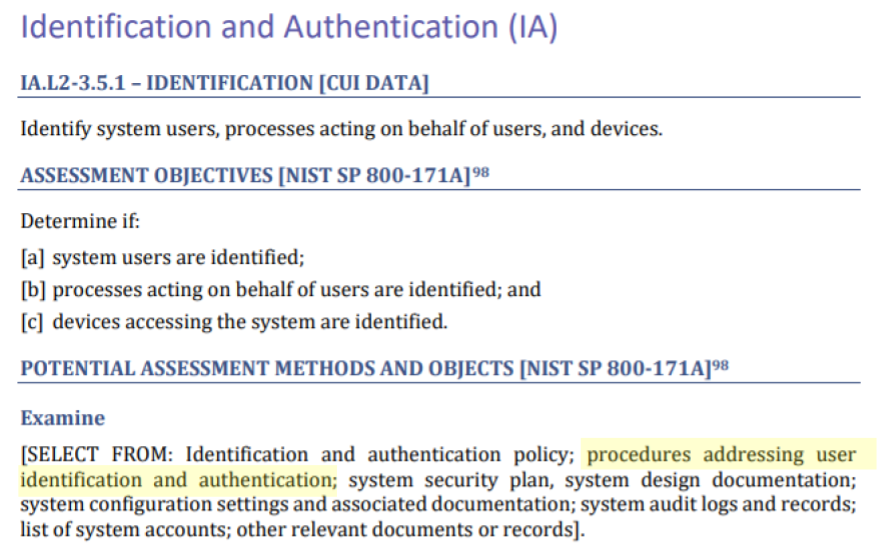
NIST identified a named set of procedures for each practice within NIST SP 800-171. The assessment guide (SP 800-171A) contains the original mappings. The CMMC assessment guides include this mapping as well. The potential assessment methods and objects section contains a subsection called examine. Within each practice, NIST identified relevant policies, procedures and other artifacts. We used the relevant procedures to organize the section headings within each policy.
To verify a new employee's identity, the organization requires two forms of evidence. This can include a driver's license and a passport. Staff must check these documents with the original source to ensure they are valid. Once verified, the system assigns every account to a specific, named individual. This includes human users, service accounts, and even external guest accounts. By assigning a human owner to every digital identity, every action is traceable back to a person.
The policy requires a strict naming format for all accounts to keep them organized. External accounts for vendors or contractors must look different from employee accounts. An internal sponsor must manage external accounts. If an account has high-level privileges, the name must state that status. The organization prohibits reusing account names for two years after a person leaves. This rule keeps audit records unique and accurate for long-term investigations.
The organization prohibits shared accounts unless a formal exception exists. If a team receives an exception to use a shared account, they must track exactly who has access to it at all times. If one person on that team no longer needs access, staff must reset the password immediately. Additionally, the system allows remote access only for valid business reasons. The access management database records remote session authorizations.
CMMC Objectives Covered in This Section:
(1) objective from AC.L2-3.1.1
(1) objective from AC.L2-3.1.12
(1) objective from AU.L2-3.3.2
(2) objectives from IA.L2-3.5.1
(1) objective from IA.L2-3.5.3
(2) objectives from IA.L2-3.5.5
Account Authentication
Before connecting any new device, staff must change all factory-default usernames and passwords. This rule applies to everything from firewalls and routers to office applications. Every new password must meet the organization's complexity standards. The organization requires multi-factor authentication for anyone accessing the network. These security layers must use replay-resistant tools to prevent reuse of active sessions.
When a user needs a password reset, staff must verify their identity. Once verified, the user receives a temporary password via an encrypted link or a phone call. The organization prohibits sending passwords through plain-text emails or chat messages. The system assigns a unique, complex password for service accounts. The system stores these passwords in a secure, encrypted vault.
Mobile devices may use biometrics, like fingerprints or facial recognition, to unlock. If a user chooses a PIN or passcode instead, it must be at least six characters long. To stop hackers from guessing a code, the device will lock itself after ten failed attempts. All login systems must use industry-standard protocols to prevent replay attacks.
CMMC Objectives Covered in This Section:
(2) objectives from AC.L2-3.1.8
(1) objective from CM.L2-3.4.2
(2) objectives from IA.L2-3.5.2
(3) objectives from IA.L2-3.5.3
(1) objective from IA.L2-3.5.4
(1) objective from IA.L2-3.5.7
(1) objective from MA.L2-3.7.5
Authenticator Feedback
Every system and application must hide passwords as users type them. Instead of showing the actual letters, the screen must display dots or asterisks. This prevents people nearby from seeing the secret code as it enters the system. When a login fails, the system must only give a generic error message. It should not tell the user if the mistake was the username or the password.
CMMC Objectives Covered in This Section:
(1) objective from IA.L2-3.5.11
Authenticator Management
Passwords must contain at least eight characters using letters, numbers, and special symbols. Users cannot use guessable information like their name, username, or the company name. When someone receives a temporary password, they must change it on their first login. The system will disable temporary passwords within 48 hours.
When it is time to create a new password, the system ensures it is different. Users cannot reuse any of their last 24 passwords. The policy also forbids making small, lazy changes, such as adding a number to the end of an old password. All passwords stay encrypted while they move across the network or sit in storage. The system stores passwords in a separate, secure area to keep them out of reach from intruders.
Older network devices might not have the ability to enforce these rules in an automated way. In those cases, privileged users must create passwords at least 15 characters long. When changing a password on these specific devices, the new one must be different from the last one used. These manual steps ensure that even older equipment stays as secure as the rest of the network.
CMMC Objectives Covered in This Section:
(2) objectives from IA.L2-3.5.10
(4) objectives from IA.L2-3.5.7
(2) objectives from IA.L2-3.5.8
(1) objective from IA.L2-3.5.9
Default Accounts
Staff must disable or remove all factory-default accounts. If the system requires one of these accounts to function, the team must rename it and change the password. The organization must assign every active default account to a specific human owner.
CMMC Objectives Covered in This Section:
(1) objective from CM.L2-3.4.2
(1) objective from IA.L2-3.5.2
Device Identification and Authentication
The system must verify the identity of every device before it joins the network. To do this, the system checks for a unique digital certificate or a managed security health check. The system blocks devices that lack a valid certificate or fail security checks.
CMMC Objectives Covered in This Section:
(1) objective from IA.L2-3.5.2
Syncing Policies with System Security Plan
FedRAMP guidance on how to write a control implementation statement states the following:
Implementation statements should reference supporting policies and procedures.
If a document is long, point to the exact sections that matter instead of the whole thing.
Write summaries so that reviewers don't have to go look up other documents.
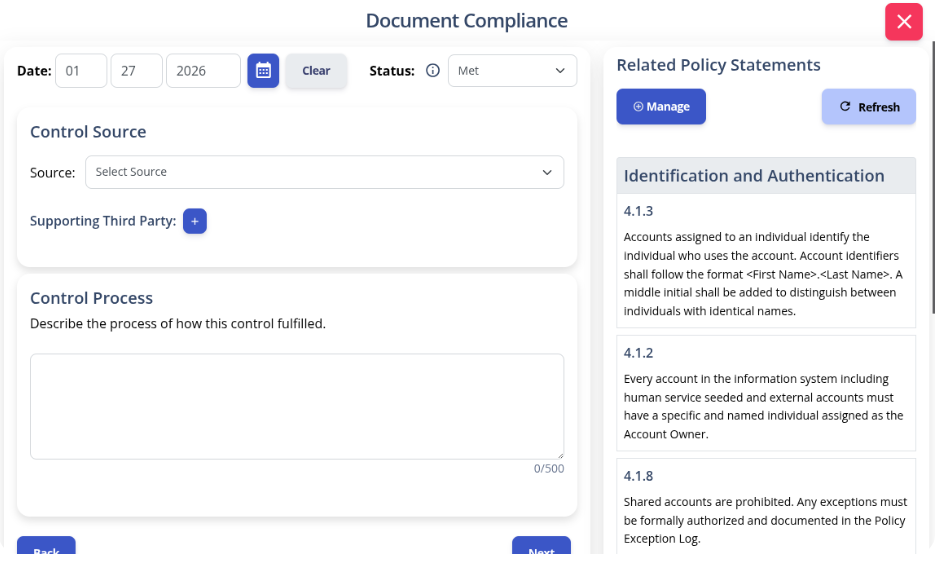
Write your policies before you start drafting your security plan. K2 GRC shows you exactly how each part of your policy connects to your security goals.
The input screen shows the specific policy rule and its ID number. This identifies relevant policy statements when writing your system security plan implementation statements. The system then adds your work to the final security plan template.
Conclusion
Identity is the heartbeat of your security. Every time someone logs into your network, you are making a high-stakes bet that they are who they say they are. When you rely on "blind trust" or weak passwords, you are risking the future of your company. There is no worse feeling than realizing an intruder walked right through the front door. We designed an Identification and Authentication Policy to give you a head start on CMMC. Take control of your digital perimeter today. Download our template to build a system that demands proof and ensures accountability.
Learn how to build an AI risk management policy that addresses governance, risk appetite, AI security risks, regulatory requirements, and ongoing monitoring.
A risk register helps organizations identify, assess, and manage potential risks in one centralized place. Learn the key components of a risk register, how to create and maintain one, and how it supports a more proactive approach to risk management.
New K2 Assist AI, AI-powered Readiness Review, MCP integration and Skills bring AI-driven execution and assessment capabilities to governance, risk, compliance and training workflows.