HIPAA Administrative Safeguards: Key Changes and New Requirements

Oct 23, 2026
Learn how the proposed HIPAA Security Rule update changes administrative safeguards, and use a 2013-to-2027 crosswalk to find your compliance gaps.
Read More
10 min read

The Media Protection (MP) domain focuses on handling physical and digital storage containers. This includes everything from USB and disk drives to documents and backup tapes. Locking down your network doesn't prevent data exfiltration on a thumb drive. The MP family controls the life-cycle of your media. You must limit who can use removable media. You must label media containing sensitive information.
When you are not using media, you must lock it up. If you need to mail a backup disk or carry a laptop to another office, you must track it. Before you reuse a drive or put it in the trash, you must wipe it clean or destroy it. Managing media protects you from physical data breaches that firewalls can't stop. Media Protection closes the gap between digital security and the physical world. It ensures that your data is as safe on a desk or in a drawer as it is behind your firewall.
Domain level policies address the controls implemented within systems and organizations. Policies are the perfect home to define control parameters, such as frequencies. Procedures describe the implementation of policies or controls. Organizations may document procedures within the system security plan or within separate documents.
Here are some of the principles that guided this media protection policy:
A cover page tracks specific details regarding the policy, including:
NIST SP 800-53 defines specific objectives for domain-level policies. From this guidance we incorporate the following major sections into our policy:
The purpose statement should identify why the policy exists and what it aims to achieve.
The scope should identify who it applies to and under what circumstances.
The policy governance section covers most of the organization defined parameters. These subsections cover the following details:
The fourth section includes our policy statements. Subsection headings group related Policy statements together. Each policy statement has a unique number for traceability to other documents. A policy statement number consists of the section, subsection, and policy statement order.
The fifth section identifies the relevant roles and responsibilities identified in the policy. A single, short paragraph describes the responsibilities for each role. The sixth section identifies the supporting procedures. We opted to align our subsection headings with the names of supporting procedures. The seventh section identifies related documents, to include relevant policies. The eighth section documents a revision history. This table captures policy changes, including: version, effective date, approver(s), change summaries. The ninth section captures a formal authorization of the policy by the policy owner.
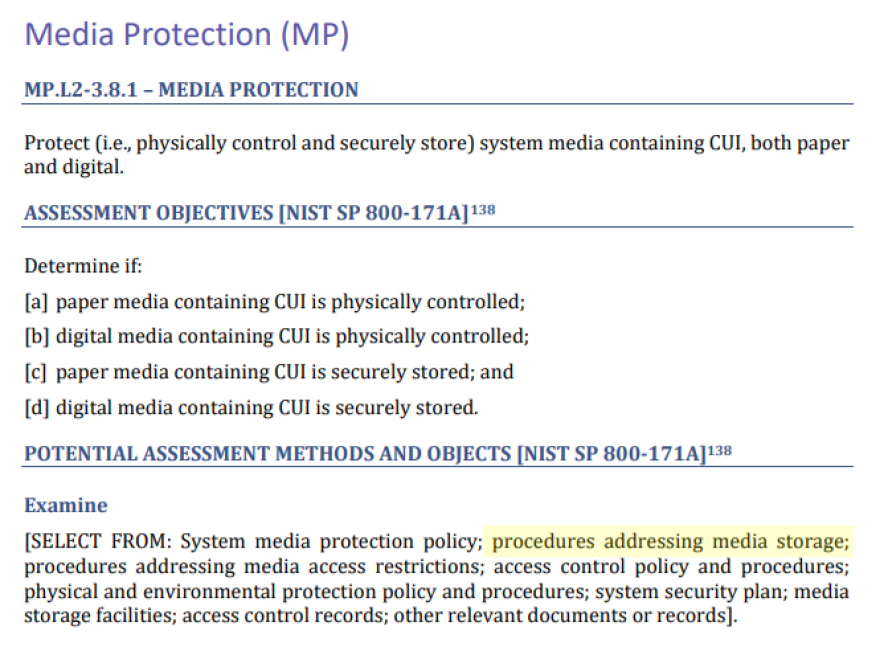
NIST identified a named set of procedures for each practice within NIST SP 800-171. The assessment guide (SP 800-171A) contains the original mappings. The CMMC assessment guides include this mapping as well. The potential assessment methods and objects section contains a subsection called examine. Within each practice, NIST identified relevant policies, procedures and other artifacts. We used the relevant procedures to organize the section headings within each policy.
The organization prohibits the use of portable media on systems handling sensitive data. To enforce this rule, staff must disable the USB ports on all relevant computers and servers. If a business task requires the use of portable media, the CISO must approve an exception. Once approved, the device receives a unique ID and a designated owner. The system inventory tracks exactly what authorized data the device may hold.
Staff must follow a safety process before connecting an authorized portable device. First, they must scan the device for viruses on a separate computer that is not connected to the internet. Second, the device must use government-approved encryption to lock the data. Devices unable to use approved encryption methods may not store sensitive information.
CMMC Objectives Covered in This Section:
Staff must label each device with the highest level of authorized information. Labels must remain legible and identify devices containing Controlled Unclassified Information (CUI).
CMMC Objectives Covered in This Section:
When authorized media is not in use, you must keep it under lock and key. This means storing devices in a secure container, such as a GSA-approved safe or a locked cabinet. You must place these containers inside a restricted area.
CMMC Objectives Covered in This Section:
Before you throw away, give away, or reuse any storage device, you must return it to the IT department. This includes everything from internal hard drives and tapes to small thumb drives. The organization must sanitize every piece of media that holds sensitive data. Clearing, purging, or destruction procedures must follow official government guidelines.
Clearing is for devices staying in the office. Purging is for equipment going to a vendor or a new department. Destruction is for broken or discarded hardware. The IT professional must verify that the data is gone. The person verifying the work should be different from the person who performed the work.
The organization keeps a formal "paper trail" for every device. For each purged or destroyed item, the team creates a Certificate of Sanitization log. This record tracks the serial number, the date, the method used, and the names of the people involved.
CMMC Objectives Covered in This Section:
FedRAMP guidance on how to write a control implementation statement states the following:
Write your policies before you start drafting your security plan. K2 GRC shows you exactly how each part of your policy connects to your security goals. This starts with selecting an objective to document.
.png)
After selecting a criteria, K2 GRC shows policy statements relevant to that criteria. The input screen shows the specific policy name and the statement’s number. This enables users to cite relevant policy sections within the control narratives. The system aggregates these control narratives to populate the system security plan (SSP).
.png)
A single lost thumb drive can undo years of hard work and destroy the trust your customers have in you. You shouldn't have to stay awake at night wondering if a hard drive in the trash still holds company secrets. By implementing a media protection policy, you replace uncertainty with a proven system. This isn't about passing an audit; it is about the peace of mind that comes from securing your data. Don't leave your physical security to chance. Download this policy template to clarify handling, storing, and destroying sensitive media. Equip your organization with the road map to stay secure and prepared for any challenge.