LMS Pricing Comparison: Models, Costs & What to Compare

Oct 28, 2026
Compare LMS pricing models, typical costs by company size, and hidden fees. Learn how to calculate total cost of ownership before you choose a platform.
Read More
10 min Read

The global learning management system (LMS) market was $28.6 billion in 2025. Experts predict this number will reach $34.1 billion in 2026. This metric directly reflects the growing demand for digital learning solutions.
Choosing an LMS takes more than finding a platform that fits your budget. Providers use different pricing models. They can also offer different features and charge different amounts for training content, integrations, and support. Without knowing these differences, it is hard to see the true cost of an LMS.
A good LMS pricing comparison looks beyond the first subscription fee. It looks at the number of users and the features your organization needs. It also looks at the cost of delivering training. Finally, it accounts for the time employees spend managing training programs.
Maybe you want an affordable LMS for a small team. Maybe you need a full corporate training solution. Either way, understanding LMS pricing can help you make a smarter choice. This guide explains common pricing models and possible hidden costs. It also covers what to think about when choosing the right LMS for your organization.
LMS pricing typically runs about $3 to $20 per user per month for SaaS platforms, while Capterra's research puts entry-level plans at $8 to $51 per user per month, depending on organization size, active users, and deployment depth. Where you land depends less on company size than on which pricing model the vendor uses. Jump to the pricing model table or the full cost breakdown.
An LMS is software that organizations use to create, deliver, manage, and track training. An LMS platform keeps learning materials in one place. It gives employees a simple way to finish training programs.
Businesses use LMS software for employee onboarding and professional development. They also use it for cybersecurity awareness and compliance training. Some platforms can assign courses automatically and send reminders. They can also track completion rates and manage certifications.
Some LMS platforms focus mainly on delivering courses. Others offer advanced features. These can include custom learning paths, detailed reports, third-party integrations, and course creation tools.
These differences change both the learning experience and the total cost of ownership. Before you compare prices, decide what your organization needs the platform to do.
LMS pricing varies because providers package their software, content, and services in different ways. Some charge based on registered learners. Others use active-user counts, subscription tiers, or custom pricing.
The best option depends on your training needs, your workforce size, and your budget. Knowing the common LMS pricing models helps you compare providers more fairly.
The number of users is one of the biggest factors in LMS pricing. Some providers charge for every employee who registers on the platform. Others only charge for employees who use it during a billing period.
Here is an example. Say an organization has 500 employees. It needs to give all of them yearly compliance training. A registered-user pricing structure would usually count all 500 employees. This is true even if some only log in once in a while.
An active-user model may cost less if only some employees use the platform each month. But costs can go up and down as participation changes.
When you compare LMS pricing options, think about these points:
These factors help you estimate your costs. They also help you pick a pricing model that fits your workforce.
The features in an LMS pricing plan can change the plan's value a lot. A basic LMS may only deliver courses and track completion.
More advanced platforms add automation, detailed analytics, custom learning paths, and integrations.
Some providers include these tools in their standard plans. Others save them for higher pricing tiers. Some charge extra fees for them.
Think about whether your organization needs:
AI tools may also be available. They can help with course creation, personalized learning, and admin tasks. But their availability and cost differ by provider.
Do not pay for every feature on the list. Pick the ones your team will actually use. The right LMS should support your training goals without adding extra costs.
Corporate training often means more than handing out courses. Organizations may need to deliver compliance training again and again. They may need to record who finished it. They may also need to watch for expired certifications and prove that employees met certain requirements.
These duties make automation, reporting, and content important when you review a corporate LMS.
For example, a platform that assigns training and launches campaigns automatically based on roles, risk levels, and policies can cut down admin work. This is helpful for programs that repeat. A central dashboard can also show incomplete or expired training. Administrators will not need to check each record by hand.
Before you pick an LMS provider, check a few things. Does the platform support your training needs? Does it have the reporting tools you need? Does it offer the right level of support?
A platform with a higher starting price may still be a better value. This can be true if it includes tools you would otherwise buy separately. It can also save admin time.
No single LMS pricing model works for every organization. Providers use different pricing structures to fit different workforce sizes, usage patterns, and technical needs.
Learning about the different pricing models helps you decide which options deserve a closer look.
Ranges are drawn from third-party sources and change often. Prices checked 10/27/26.
Per-user pricing usually charges you based on the number of learners in your agreement. But the meaning of a billable user is different for each provider.
Two common approaches are:
This difference matters. An active-user plan may look cheaper. But you should know what counts as activity and how to measure usage. You should also ask whether monthly costs can change.
Compare both models using your expected workforce size and training schedule. Do not rely only on the advertised starting prices.
Subscription-based LMS platforms usually charge a monthly or yearly fee. Some offer one flat rate. Others use tiered pricing plans with different user limits and features.
A tiered pricing model might include a basic plan for small organizations. It might have a mid-level plan with more reporting tools. It might also have an enterprise plan with advanced integrations or customization.
This setup makes it easy to start small and upgrade later as your needs change. But some features may only come with higher tiers.
When you review subscription options, ask:
Your goal is to find a pricing plan that meets your needs today. It should also leave room to grow.
Enterprise LMS platforms may offer custom pricing. The price is based on your organization's size, technical needs, and the services you want. Some vendors, like K2 GRC, publish how their pricing is structured even when final quotes are tailored.
Custom pricing can work well for businesses with special needs. These might include specific integrations, large-scale user management, custom reports, or unique training workflows. The provider can shape the agreement around those needs.
However, a custom quote can make it harder to compare vendors. Each proposal may include different features and services.
Ask for an itemized list of costs. Confirm what it comes with and what costs extra. Also ask how the price changes as your organization grows.
Flexible pricing works best when it matches your real training needs. A custom agreement should make it clear what you get. It should also show what you will pay over time.
Published LMS prices vary a lot. The biggest driver is the pricing model, not the size of your company. Capterra's research reports that entry-level plans start around $8 to $51 per user per month, and high-end plans reach up to $363 per user. Still, a few benchmarks hold up across sources.
Other sources land in a similar zone. One reports that small teams typically spend $1,500–$10,000 in total once add-ons are included, mid-sized organizations often spend $15,000–$75,000, and enterprise deployments run well past $100,000. Treat these as planning ranges, not quotes.
Remember the organization with 500 employees? Say 200 of them are active in a typical month. Using the benchmarks above:
The active-user model has a lower floor, but the ceiling is the same. It only saves money if your activity stays low and the vendor's definition of "active" works in your favor. These figures are illustrative arithmetic, not a quote.
Fees outside the subscription add up. Capterra's research points to implementation, integration, and support as common hidden-cost areas, and its 2026 buyer survey found that 45%of software buyers were disappointed with at least one recent purchase. As a hypothetical, a platform quoted at $8 per user per month for 150 users costs $14,400 a year, or $43,200 over three years.
Add a $3,500 setup fee, $1,500 a year for a content library, and $2,000 a year for premium support, and the three-year total rises to $57,200, about 32% more than the quote suggested. That is why comparing quotes on a three-year total cost of ownership is so useful. The next section covers the most common hidden costs.
Some vendors publish rates and some don't. That split is a quick way to shorten your list. TalentLMS publishes its plan prices, while Docebo prices through custom quotes. Vendr, which tracks real purchases, reports a median of about $42,000 a year for Docebo contracts.
TalentLMS is a useful example of tiered pricing:
Prices checked 10/27/2026.
An LMS subscription fee is not always the full cost of running the platform. Other expenses can show up during setup, content creation, integration, or daily administration.
Finding these hidden costs in LMS pricing early helps you compare providers more fairly.
Training content can take up a large part of your LMS budget. Some platforms include a course library in the subscription. Others make you buy content separately.
Building courses in-house has costs too. You may need instructional design skills, authoring tools, and employee time. You will also need to keep the courses up to date.
Before you choose an LMS, decide how you will get your training. You could create it from scratch. You could upload materials you already have. Or you could use ready-made courses from a catalog of compliance training modules.
Up-to-date content is very helpful for compliance work. Rules and best practices change. Old materials may take extra time and money to replace.
Ask each provider some questions. Is the course library part of the quoted price? How are content updates handled? Can we upload our own materials or customize the LMS?
Starting a new learning platform can involve setup fees and data migration. It can also involve employee onboarding and links to your current business systems.
Some organizations are switching from another LMS. They may need to move employee records, completion histories, and certification documents. How hard this is depends on the platforms and how much data you are moving.
Third-party tools and custom integrations can add development or subscription costs.
Before you sign an agreement, find out if they include implementation and onboarding. Ask how your current training records can be moved. Also ask if integrations have separate fees.
Planning for these costs helps you avoid surprises during setup.
Not every LMS cost shows up on an invoice. Admin time adds to the total cost of managing training programs.
Without good automation, employees may need to assign courses by hand. They may also send follow-up emails, check completion spreadsheets, and track when certifications expire.
These tasks take more time as your workforce grows or compliance rules change.
An LMS can automate assignments, reminders, completion tracking, and reports. This can cut down on repeat admin work. But the real benefit depends on the platform's features and how well your team uses them.
When you compare providers, think about how much time your team spends on training now. Include that time in your review. Do not compare subscription fees alone.
A good LMS pricing comparison looks at the whole solution. It does not look only at the monthly or yearly fee. Two platforms may have similar prices. But they can differ a lot in content libraries, automation, support, and setup needs.
Use the criteria below to compare providers.
Start by reviewing the content each LMS provides. A platform with a large library of useful courses may save you money. You might not need to buy other training or build it yourself.
Look at the range of topics and how often they update courses. Check the languages offered. Also assess whether the courses match your organization's training needs.
For compliance training, find out if the library covers the courses your employees must complete. You should also confirm that you can upload your own materials or ask for custom training.
Compare the cost of the included content with the cost of getting similar training somewhere else.
Automation can make a big difference in how well your organization manages training.
Look for features that handle automatic assignments and repeating training schedules. Also look for reminders, employee enrollment, and completion tracking.
Check how administrators find training information too. A central dashboard makes it easier to spot employees with open assignments or expired certifications.
These tools are very useful for organizations with recurring compliance programs. This is especially true across many teams or locations.
When you compare LMS platforms, confirm which automation features come with each pricing plan. Also check whether advanced tools need an upgrade.
Reporting and certification tools help organizations track training progress. They also help keep records of completion.
Look for a platform with clear reports and easy-to-find certificates. You should also see which training is current and which has expired. Find out if administrators can get the records they need. They should not have to pull information together from many places.
Integrations matter too. Single sign-on, for example, makes it easier for employees to log in. It also works with your current sign-in process.
Ask providers about reporting limits, certificate storage, data migration, and integration fees. These details can affect both the cost and the usefulness of the LMS over time.
The total cost of ownership (TCO) is the full cost of buying and running an LMS over a set period.
Do not focus only on the subscription fee. Count both the recurring costs and the one-time costs.
Use this checklist when you compare quotes:
Compare these costs over the same time frame, such as one year or three years. This gives you a fairer way to review different LMS pricing models.
An LMS with a low upfront fee may not be the most cost-effective LMS. It might require substantial additional spending. A fuller platform may be the better value. It might include the content and tools you would otherwise buy separately.
The best LMS is not always the cheapest one. It is also not always the one with the most features. It is the platform that meets your training needs at a cost you can afford.
Some businesses manage compliance training. Their selection process should look at course availability and recurring assignments. It should also consider documentation, reporting, and how easy the system is to run.
Start by listing the training programs your organization must deliver. These might include cybersecurity awareness, workplace safety, HIPAA, ethics, harassment prevention, CUI handling for defense contractors, or continuing education.
Next, decide how often employees must finish each program. Decide which teams need access. Also decide how you will record completion.
You should also think about other needs. Do you need courses in more than one language? Do you need mobile access or custom learning materials?
These needs will help you narrow your LMS options. They will also keep you from paying for features that do not support your goals.
Next, look at how each LMS handles recurring training and completion records.
Look for automatic assignments and reminders. Look for dashboards that show employee progress. Also look for tools that flag expired training. Make sure certificates are easily accessible to administrators.
Think about how these features fit your current workflow. Your team may spend a lot of time following up with employees or tracking records by hand. If so, automation may lighten that load.
A platform should make training easier to manage. It should not add one more layer of admin work.
Once you know your needs, compare the LMS pricing models that fit your organization best.
Think about your current number of users and how much you expect to grow. Think about how often you train, what content you need, and how much admin work you expect. Review the full cost of each option. Include extra services and possible upgrades.
You should also look at the learning experience. Employees should be able to log in and find their way around easily. This makes it simpler to deliver training on a steady basis.
The right learning management system should balance cost, features, and room to grow. Choose a solution that meets your needs now. It should not create extra costs as your training programs expand.
K2 GRC eLearning is the learning management service inside the K2 GRC platform. Pricing is built from a few parts rather than one flat per-user number, so you pay for what you use.
What an annual license depends on. The cost of an annual license varies with your organization's size and specific needs, and quotes are tailored. To get an accurate quote, have these ready:
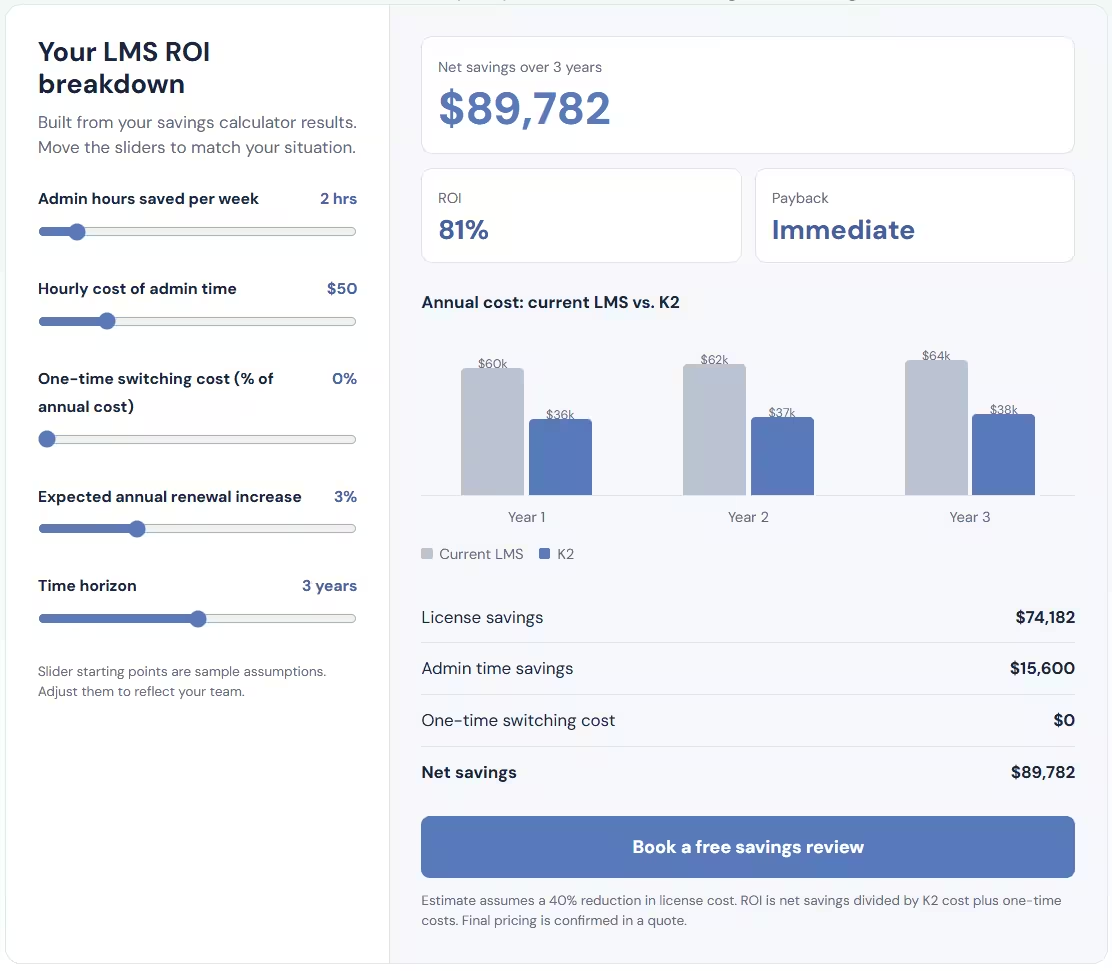
It is easier to compare LMS pricing models when you know what you spend now.
The K2 GRC LMS Pricing Calculator helps organizations estimate possible savings. It uses your current LMS costs. Use it to review your current spending and find ways to stretch your training budget.
When you look at your results, think about the wider costs of managing employee training. These include course content and admin work. They also include certification tracking and the tools your team needs to stay compliant.
K2 GRC's eLearning feature offers a learning management system built for compliance. It includes more than 700 compliance training and continuing education modules. Organizations can use the course catalog. They can also add their own training materials to meet their workforce's needs.
The platform also supports automated training assignments and repeating schedules. It sends reminders and manages certifications. It also reports on progress. These tools let administrators manage training in one central place. They do not need to rely only on manual work.
K2 GRC's eLearning feature also offers multilingual content in over 100 languages. It works on mobile and desktop. It also supports single sign-on.
Are you reviewing LMS solutions for compliance training? Compare your current setup with the features your organization needs.
Calculate your potential LMS savings or take the self-paced eLearning demo. You can also request a demo to see the platform and decide if it fits your training needs.
The K2 GRC LMS Pricing Calculator compares what you pay for your current LMS with what you would pay switching to K2. Organizations can see estimated savings of up to 40%.
Your own result depends on what you pay today. The calculator looks at how many learners you have, your current billing structure (total annual cost vs cost per learner), and how much you pay per year. The biggest differences usually come from costs that sit outside the subscription fee:
The estimate is a starting point, if you're satisfied with how much we could save you reach out to us directly!