This blog explains how Configuration Management (CM) helps organizations keep their systems secure, organized, and compliant. It breaks down how to track system components, create secure baselines, control changes, and align policies with CMMC and NIST requirements.
Key Takeaways
✅ Keep a complete inventory of all hardware and software to eliminate “mystery devices.”
✅ Build secure system baselines and monitor them regularly to prevent unauthorized changes.
✅ Use formal change management and least functionality rules to reduce risk and support CMMC compliance.
Who Should Read This?
This guide is ideal for compliance officers, IT managers, security teams, and organizations preparing for CMMC or NIST assessments. It’s especially helpful if you’re struggling to align your policies with your system security plan or need a structured way to manage system configurations and changes.
Configuration Management Domain
The Configuration Management (CM) domain acts as the blueprint for your system. It ensures that every component stays in its approved state from the moment it is set up. Without these controls, systems become a collection of mystery devices impossible to defend.
The CM family requires you to know exactly what is on your network and its configuration. You must keep a complete list of every hardware and software component you own. You create a "standard build" or a safe starting point for every system. Configuration baselines enable faster recovery from system crashes.
You must manage any changes to your systems. Change control ensures that updates don't break system functionality. Hardening systems limit the attack surface, giving attackers fewer ways to break in.
Domain level policies address the controls implemented within systems and organizations. Policies are the perfect home to define control parameters, such as frequencies. Procedures describe the implementation of policies or controls.
Organizations may document procedures within the system security plan or within separate documents. Here are some of the principles that guided this configuration management policy:
Restating controls does not constitute an organizational policy or procedure.
Policies should omit references to specific technologies.
Address procedures to the individual or role performing the task.
Use plain language when writing procedures and avoid technical jargon.
Policy Structure
A cover page tracks specific details regarding the policy, including:
Version - number capturing major and minor policy revisions
Effective Date - date of policy dissemination
Last Review Date - date the policy was last reviewed
Next Scheduled Review Date - the date for the next mandatory policy evaluation
Classification - internal categorization of the policy’s sensitivity for confidentiality
NIST SP 800-53 defines specific objectives for domain-level policies. From this guidance we incorporate the following major sections into our policy:
The purpose statement should identify why the policy exists and what it aims to achieve.
The scope should identify who it applies to and under what circumstances.
The policy governance section covers most of the organization defined parameters. These subsections cover the following details:
Policy Dissemination List - defines roles or personnel to disseminate the policy
Procedure Dissemination List - defines roles or personnel to disseminate the procedures
Policy Owner - defines an official to management the policy and supporting procedures
Policy Review Frequency - how often the organization reviews and updates the policy
Policy Review Triggers - events that require an out-of-cycle policy review or update
Procedure Review Frequency - how often the organization reviews and updates the procedures
Procedure Review Triggers - events that require an out-of-cycle procedure review or update
The fourth section includes our policy statements. Subsection headings group related Policy statements together.
Each policy statement has a unique number for traceability to other documents. A policy statement number consists of the section, subsection, and policy statement order.
The fifth section identifies the relevant roles and responsibilities identified in the policy. A single, short paragraph describes the responsibilities for each role. The sixth section identifies the supporting procedures. We opted to align our subsection headings with the names of supporting procedures.
The seventh section identifies related documents, to include relevant policies. The eighth section documents a revision history. This table captures policy changes, including: version, effective date, approver(s), change summaries. The ninth section captures a formal authorization of the policy by the policy owner.
Policy Statements
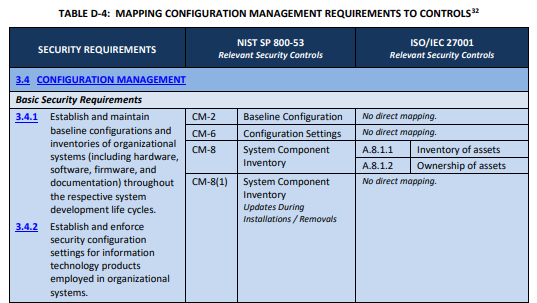
NIST identified a named set of procedures for each practice within NIST SP 800-171. The assessment guide (SP 800-171A) contains the original mappings. The CMMC assessment guides include this mapping as well.
NIST derived these assessment objects from SP 800-53A. Table D maps SP 800-171 security requirements to controls from SP 800-53. For this domain, we followed the original procedures defined for the underlying controls. We used the relevant procedures to organize the section headings within each policy.
The organization uses automated tools to find devices in real time. These tools must detect new or unauthorized hardware the moment it connects. Every week, staff compare these scan results against the official inventory. If they find a legitimate device that was missing, they must add it immediately. If they find an unknown device, they must isolate it and investigate it as a potential threat.
The inventory acts as the source of truth and must include deep details for every asset. Each device needs a primary and secondary person in charge of it to track its location and settings.
To stay current, staff must perform a physical audit of all hardware at least once a year. The organization keeps a "whitelist" of approved software and patches. The security team reviews the software list every three months to keep it updated.
CMMC Objectives Covered in This Section:
(1) objective from AC.L2-3.1.1
(1) objective from AC.L2-3.1.16
(1) objective from AC.L2-3.1.18
(1) objective from AC.L2-3.1.19
(1) objective from AC.L2-3.1.3
(3) objectives from CM.L2-3.4.1
(2) objectives from CM.L2-3.4.7
(3) objectives from CM.L2-3.4.8
(1) objective from CM.L2-3.4.9
(1) objective from IA.L2-3.5.1
(1) objective from RA.L2-3.11.3
(1) objective from SC.L2-3.13.12
(2) objectives from SC.L2-3.13.13
Baseline Configuration of the System
System baselines serve as the official guide for how every device should look and act. These guides include the approved versions of operating systems, software, patches, and firmware. Each baseline must list the only ports and services the system needs to do its job. Staff disable any service not on this list. Staff must create setups before connecting a new system.
The organization captures baselines every month or uses tools to watch them in real time. This allows the team to spot unauthorized changes or hidden weaknesses. Staff review baselines every year and keep at least three older versions of each. This allows the team to roll back to a safe state if an update fails and provides a history for analysis.
CMMC Objectives Covered in This Section:
(3) objectives from CM.L2-3.4.1
(1) objectives from CM.L2-3.4.2
(9) objectives from CM.L2-3.4.7
(2) objectives from IR.L2-3.6.1
Configuration Settings for the System
The organization must set up systems to perform only necessary tasks for business. Staff must turn off all unneeded functions, ports, and services. No one may install software or components without the change advisory board's approval.
Only authorized people can use administrative tools or menus that change security settings. Administrative tools must be separate from regular applications and protected by authentication controls.
If a team must skip a security setting for a business reason, they must document that choice. Systems that cannot use multi-factor authentication must stay disconnected from sensitive data. Access for these devices requires a formal and approved exception.
CMMC Objectives Covered in This Section:
(1) objective from CM.L2-3.4.2
(2) objectives from CM.L2-3.4.6
(5) objectives from CM.L2-3.4.7
(1) objective from IA.L2-3.5.11
(1) objective from SC.L2-3.13.3
Least Functionality in the System
Systems must block all software by default and only allow white-listed programs. Staff must disable all unused wired network ports. If a port in a public area must stay active, the team must protect it using special filters or access controls. Staff must audit the physical office quarterly to find and remove unauthorized hardware.
CMMC Objectives Covered in This Section:
(2) objectives from CM.L2-3.4.7
(1) objectives from CM.L2-3.4.8
Change Management
The organization creates and maintains a formal plan to manage all system settings. Staff review once a year and protect it from unauthorized access. The team treats this plan, the baselines, and inventory as sensitive information. Access to these records follows the principle of least privilege. This ensures that only people who need the information can see or change it.
All security changes must go through a formal process to analyze their impact on safety. The team labels changes as Major, Minor, or Emergency to decide how much oversight they need. Simple tasks like resetting a password do not go through this formal process.
For more complex work, a Change Advisory Board meets monthly to review and vote on proposals. A major change cannot move forward if even one board member disagrees. Major changes also need a final sign-off from an executive officer.
Before any change goes live, the team must test it in a separate environment to ensure it works and stays secure. This testing includes a review of security checklists and vulnerability databases. Every plan must include a verified way to roll back the change if something goes wrong. Staff must document all results before receiving final approval. The organization keeps these change records for at least six years to support audits.
CMMC Objectives Covered in This Section:
(1) objective from AC.L2-3.1.1
(1) objective from AC.L2-3.1.5
(1) objective from CM.L2-3.4.1
(1) objective from CM.L2-3.4.2
(4) objectives from CM.L2-3.4.3
(1) objective from CM.L2-3.4.4
(4) objectives from CM.L2-3.4.5
(3) objectives from MA.L2-3.7.2
Replacement or Continued Use of Unsupported Components
All systems and software must use versions receiving active support from their vendors. This ensures the vendor provides updates and patches needed to fix weaknesses.
CMMC Objectives Covered in This Section:
(1) objective from CM.L2-3.4.2
User Installed Software
Regular users cannot install any software or programs from outside sources. Users may only install software that the organization has authorized for their use.
CMMC Objectives Covered in This Section:
(2) objectives from CM.L2-3.4.9
Media Access Restrictions
The organization disables all external media and local printers by default. Any staff member who needs to use these tools must get approval through a policy exception. Staff track each exception in a database and review them every three months.
CMMC Objectives Covered in This Section:
(3) objectives from CM.L2-3.4.7
(1) objective from MP.L2-3.8.2
Syncing Policies with System Security Plan
FedRAMP guidance on how to write a control implementation statement states the following:
Implementation statements should reference supporting policies and procedures.
If a document is long, point to the exact sections that matter instead of the whole thing.
Write summaries so that reviewers don't have to go look up other documents.
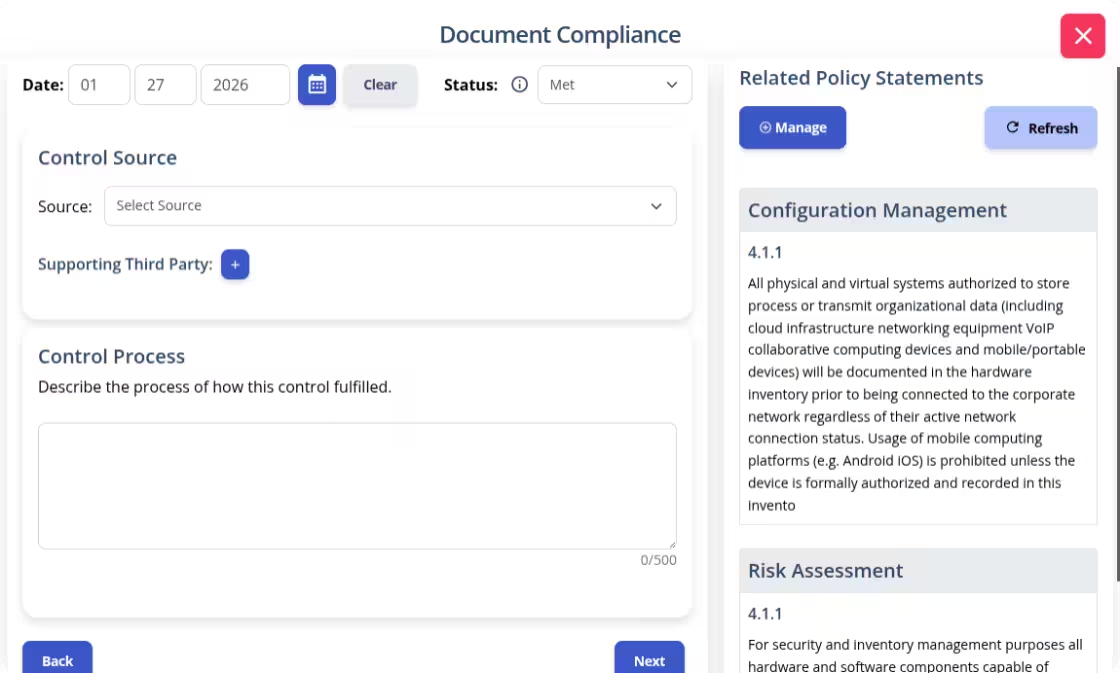
Write your policies before you start drafting your security plan. K2 GRC shows you exactly how each part of your policy connects to your security goals.
The input screen shows the specific policy rule and its ID number. This identifies relevant policy statements when writing your system security plan implementation statements. The system then adds your work to the final security plan template.
Conclusion
Managing a network can often feel like trying to solve a puzzle while the pieces are changing. It is exhausting to worry about "mystery devices" or updates that could open a back door for attackers. You deserve to feel in control of your technology. When you have a plan, you move from a state of constant fire-fighting to a state of intentional security.
Building a Configuration Management policy from scratch is a massive task. We want to help you replace that stress with confidence. Our Configuration Management Policy gives you the professional foundation to protect your business. It turns complex requirements into a clear blueprint that your team can actually use. Download our policy template and start building the trusted environment your organization deserves.
❓ Frequently Asked Questions About Configuration Management (CM)
What is the Configuration Management (CM) domain?
The Configuration Management domain acts as a system blueprint. it ensures all hardware and software components stay in an approved, trusted state through inventory tracking, baseline configurations, and formal change control.
What is a system baseline configuration?
A baseline is an official guide for how a device should be configured. It includes approved versions of operating systems, software, and firmware, and lists only the essential ports and services required for the system to function.
How does the Change Advisory Board (CAB) function?
The CAB meets monthly to review and vote on major system changes. To ensure security, a major change cannot proceed if even one board member disagrees, and it requires final approval from an executive officer.
What is "Least Functionality" in cybersecurity?
Least Functionality is the practice of configuring systems to provide only essential capabilities. This involves whitelisting approved programs, disabling unused network ports, and turning off any unnecessary services to reduce the attack surface.
Learn how to build an AI risk management policy that addresses governance, risk appetite, AI security risks, regulatory requirements, and ongoing monitoring.
A risk register helps organizations identify, assess, and manage potential risks in one centralized place. Learn the key components of a risk register, how to create and maintain one, and how it supports a more proactive approach to risk management.